
Video Tutorial
n8n Tutorial 3: Turn Airtable Records into Image Variants Using Layerre
•10 min read
In this video
- Create a Layerre template from a Canva design URL
- Pull records from Airtable with n8n
- Generate image variants per record
- Write image URLs back into Airtable rows
Connect Airtable and Layerre with n8n: one template, records from your base, variants generated and written back so everything stays in sync. Fits right into an existing Airtable workflow.
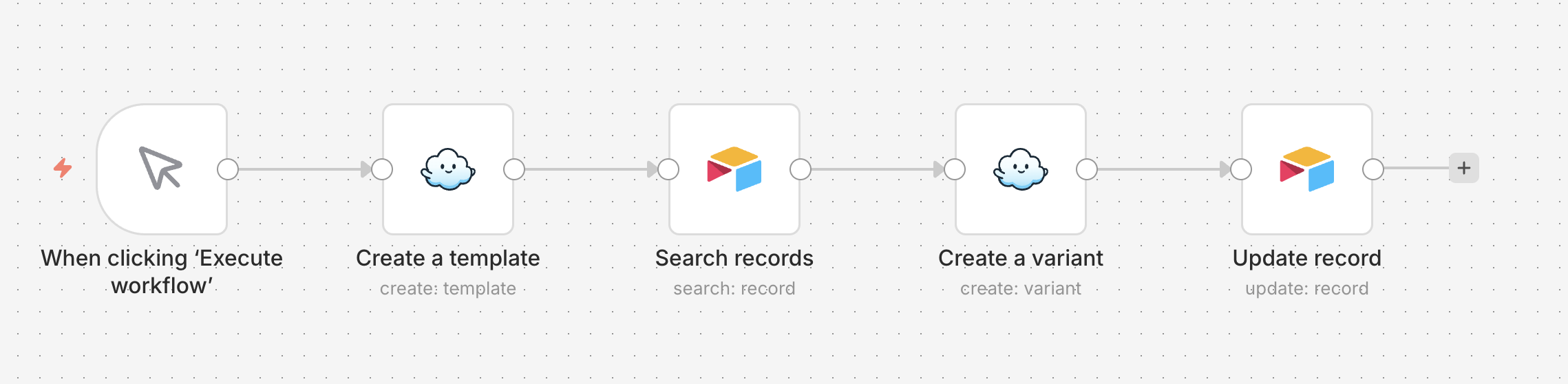
The workflow
- Airtable node fetches records (optional view/filter)
- Layerre creates template from Canva URL
- Loop each record → Layerre generates image
- Update Airtable record with the image URL
Prerequisites
Ready to try Layerre?
Create templates from your Canva designs and generate image variants at scale. No code required. Start in the dashboard or connect via API.