














Layerre API Documentation
Create dynamic design variations at scale with the Layerre API. Generate images programmatically from your design templates, automate repetitive workflows, and maintain visual consistency across every output. Currently, the API supports templates built in Canva.
Quickstart Guide
Get up and running with Layerre in minutes. Follow these simple steps to create your first dynamic image variant. Currently, Layerre supports Canva designs only.
Step 1: Get Your API Key
First, generate an API key from your dashboard to authenticate your API requests.
Get Your API Key →Step 2: Get Your Canva Share URL
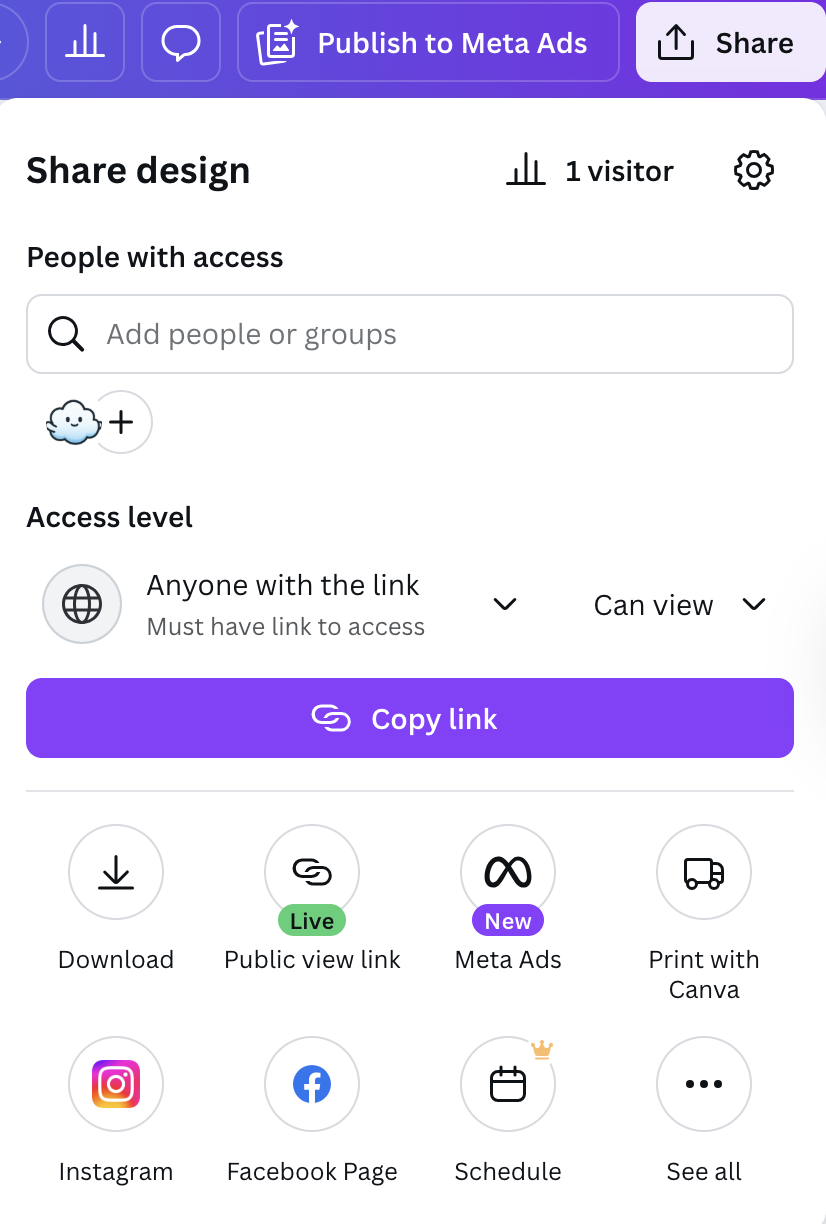
Open your design in Canva and get a shareable link that Layerre can use to import your design.
Click the "Share" button in the top right corner
Click "Anyone with the link" and copy the link
Step 3: Create a Template from Canva
Import your Canva design as a template. Layerre automatically extracts the layers, fonts, images, and other properties from the design. Note: When pasting your Canva URL, ensure it is not escaped (no backslashes before ? or & characters).
curl -X POST "https://api.layerre.com/v1/template" \
  -H "Authorization: Bearer YOUR_API_KEY" \
  -H "Content-Type: application/json" \
  -d '{"canva_url": "https://www.canva.com/design/..."}'
Step 4: Get Template Details
Retrieve your template with all its editable layers.
curl "https://api.layerre.com/v1/template/{template_id}" -H "Authorization: Bearer YOUR_API_KEY"Step 5: Generate a Variant
Create a customized version by overriding text, images, or other layer properties.
curl -X POST "https://api.layerre.com/v1/template/{template_id}/variant" -H "Authorization: Bearer YOUR_API_KEY" -H "Content-Type: application/json" -d '{"overrides": [{"layer_id": "text-layer-uuid", "properties": {"text": "Hello, World!"}}], "export_type": "png"}'Step 6: Bulk Variants and Combined PDFs (Optional)
Render many variants in one request. Set combine_pdf=true (Plus+ only, PDF export) to merge all items into one multi-page PDF. Each item can target a different page_number for multi-page designs.
curl -X POST "https://api.layerre.com/v1/template/{template_id}/variant/bulk" \
  -H "Authorization: Bearer YOUR_API_KEY" \
  -H "Content-Type: application/json" \
  -d '{
    "export_type": "pdf",
    "combine_pdf": true,
    "items": [
      {
        "page_number": 0,
        "overrides": [
          { "layer_id": "page-1-text-uuid", "properties": { "text": "Headline A" } }
        ]
      },
      {
        "page_number": 1,
        "overrides": [
          { "layer_id": "page-2-text-uuid", "properties": { "text": "Subtitle A" } }
        ]
      }
    ]
  }'
Key Concepts
Understanding the core building blocks of the Layerre API will help you get the most out of the platform.
Templates
The foundation of your designs. Templates contain all the layers (text, images, etc.) that can be customized. Once created, a single template can be used to generate unlimited variants with different content.
Layers
Editable elements within templates. Each layer represents a specific component (text, image) that can be customized independently. Layers preserve their styling, fonts, positioning, and other properties from the original design.
Variants
Generated images with custom content. Each variant is created by applying overrides to specific layers in your template. Create unlimited variants from one template with different text, images, colors, or other layer properties.
Overrides
Layer-specific customizations applied when generating variants. Overrides allow you to change text content, swap images, modify colors, adjust positioning, and update other properties without affecting the template itself.
Bulk variants
Create many variants in a single API call via POST /v1/template/{template_id}/variant/bulk. Each item in the batch shares one export_type and can specify its own overrides and page_number. Use this for high-volume generation without sending one request per variant.
Combined PDFs
On Plus+ plans, set combine_pdf=true on a bulk PDF request to merge every item into one multi-page PDF in a single render pass. Combined PDFs are saved as variants with is_combined_pdf=true and combined_section_count indicating how many sections were merged. This works for multiple variations on one page or for exporting every page of a multi-page design together.
Authentication
The Layerre API uses bearer token authentication. Include your API key in the Authorization header for all requests.
curl "https://api.layerre.com/v1/templates" -H "Authorization: Bearer YOUR_API_KEY"Keep your API keys secure! Never share them publicly or commit them to version control.
Rate Limiting
To ensure fair usage and system stability, the Layerre API implements rate limiting on all endpoints. Rate limits are applied per IP address.
Rate Limit Details
- •10 requests per second - Sustained rate limit
- •20 requests burst - Allows short spikes in traffic
- •600 requests per minute - Maximum per minute
429 Too Many Requests
When you exceed the rate limit, the API returns a 429 Too Many Requests status code with a JSON error response.
HTTP/1.1 429 Too Many Requests
Retry-After: 10
Content-Type: application/json

{
  "error": "Rate limit exceeded",
  "message": "Too many requests. Please try again later.",
  "retry_after": 10
}
Multi-page imports
Plus and Pro plans can import multiple pages from a single Canva design. Free and Starter plans import the first page only.
Plan limits
- Plus, up to 25 pages per design
- Pro, up to 200 pages per design
- Free / Starter, first page only
A multi-page import counts as one render, regardless of how many pages are imported.
Template response
Multi-page templates include a page_count field. Each layer has a page_number (0-based). If a design has more pages than your plan allows, extra pages are skipped and a warning is included in the template's warnings array.
Generating variants
By default, variants render one page at a time. Pass page_number on variant create requests to select which page's layers to use. Defaults to 0 (first page).
curl -X POST "https://api.layerre.com/v1/template/{template_id}/variant" \
  -H "Authorization: Bearer YOUR_API_KEY" \
  -H "Content-Type: application/json" \
  -d '{
    "page_number": 1,
    "export_type": "png",
    "overrides": [
      { "layer_id": "LAYER_UUID", "properties": { "text": "Updated headline" } }
    ]
  }'
Bulk variants and combined PDFs
Use POST /v1/template/{template_id}/variant/bulk to render many variants in one request. Set combine_pdf=true (Plus+ only, PDF export) to merge every item into one multi-page PDF via a single render pass. Each bulk item can use a different page_number, so you can export an entire multi-page design in one file.
curl -X POST "https://api.layerre.com/v1/template/{template_id}/variant/bulk" \
  -H "Authorization: Bearer YOUR_API_KEY" \
  -H "Content-Type: application/json" \
  -d '{
    "export_type": "pdf",
    "combine_pdf": true,
    "items": [
      {
        "page_number": 0,
        "overrides": [
          { "layer_id": "PAGE_1_TEXT_UUID", "properties": { "text": "Headline A" } }
        ]
      },
      {
        "page_number": 1,
        "overrides": [
          { "layer_id": "PAGE_2_TEXT_UUID", "properties": { "text": "Subtitle A" } }
        ]
      }
    ]
  }'
Combined PDFs are persisted as variants with is_combined_pdf=true and combined_section_count set to the number of sections merged. The bulk response includes a combined_pdf.variant object with the saved record.
Only layers on the selected page are eligible for overrides. Non-combined variants store the page_number they were generated from.
Templates
/v1/templateCreate Template
Create a template from a Canva URL. This endpoint processes a Canva URL and extracts template information including layers, dimensions, and other metadata.
Example Request
curl -X POST "https://api.layerre.com/v1/template" -H "Authorization: Bearer YOUR_API_KEY" -H "Content-Type: application/json" -d '{
  "canva_url": "https://www.canva.com/design/...",
  "tags": [
    "campaign",
    "summer-2026"
  ]
}'/v1/template/{template_id}Get Template
Get a template by ID with all its layers. Refreshes signed URLs for all image layers.
Parameters
template_idstringrequiredExample Request
curl -X GET "https://api.layerre.com/v1/template/{template_id}" -H "Authorization: Bearer YOUR_API_KEY"/v1/template/{template_id}Update Template
Update a template (name, width, height, backgrounds) and/or layers.
Parameters
template_idstringrequiredExample Request
curl -X PATCH "https://api.layerre.com/v1/template/{template_id}" -H "Authorization: Bearer YOUR_API_KEY" -H "Content-Type: application/json" -d '{
  "name": "My Template",
  "width": 800,
  "height": 600,
  "background_color": "#FFFFFF",
  "page_backgrounds": {
    "1": "#1A1A2E",
    "9": "#000000"
  },
  "layers": [
    {
      "id": "example_string",
      "name": "Title Layer",
      "layer_type": {},
      "x": 0,
      "y": 0,
      "position": 0,
      "properties": {
        "width": 100,
        "height": 100,
        "color": "#FF0000",
        "rotation": 0,
        "text": "Hello World",
        "font_size": 16,
        "font_name": "Arial",
        "font_style": {
          "weight": "example_string"
        },
        "text_align": {},
        "text_direction": "rtl",
        "letter_spacing": 0,
        "line_spacing": 1000,
        "vertical_align": "middle",
        "img_url": "https://example.com/image.png",
        "image_fit": "contain",
        "image_position": "top-center",
        "signed_url_expiry": "example_string",
        "opacity": 1,
        "flip_horizontal": false,
        "flip_vertical": false
      }
    }
  ],
  "tags": [
    "campaign",
    "summer-2026"
  ]
}'/v1/template/{template_id}Delete Template
Soft delete a template.
Parameters
template_idstringrequiredExample Request
curl -X DELETE "https://api.layerre.com/v1/template/{template_id}" -H "Authorization: Bearer YOUR_API_KEY"/v1/templatesList Templates
List all templates for the current user, sorted by last modified. Includes variant counts.
Parameters
skipintegerNumber of templates to skip
limitintegerMaximum number of templates to return
include_layersbooleanWhether to include layers in the response (slower for large templates)
tagFilter templates to those that have this tag. Case-insensitive.
qSearch templates by name (case-insensitive substring).
Example Request
curl -X GET "https://api.layerre.com/v1/templates?skip=0&limit=100&include_layers=false&tag=value&q=value" -H "Authorization: Bearer YOUR_API_KEY"Layers
/v1/template/{template_id}/layerCreate Layer
Create a new layer for a template. Accepts either img_url or text to create image or text layers respectively.
Parameters
template_idstringrequiredExample Request
curl -X POST "https://api.layerre.com/v1/template/{template_id}/layer" -H "Authorization: Bearer YOUR_API_KEY" -H "Content-Type: application/json" -d '{
  "name": "Title Layer",
  "layer_type": {},
  "x": 0,
  "y": 0,
  "properties": {
    "width": 100,
    "height": 100,
    "color": "#FF0000",
    "rotation": 0,
    "text": "Hello World",
    "font_size": 16,
    "font_name": "Arial",
    "font_style": {
      "weight": "example_string"
    },
    "text_align": {},
    "text_direction": "rtl",
    "letter_spacing": 0,
    "line_spacing": 1000,
    "vertical_align": "middle"
  }
}'/v1/template/{template_id}/layer/{layer_id}Get Layer
Get a specific layer by ID. Refreshes signed URL if expired.
Parameters
template_idstringrequiredlayer_idstringrequiredExample Request
curl -X GET "https://api.layerre.com/v1/template/{template_id}/layer/{layer_id}" -H "Authorization: Bearer YOUR_API_KEY"/v1/template/{template_id}/layer/{layer_id}Update Layer
Update a layer. Supports updating text content, img_url, or any other layer properties.
Parameters
template_idstringrequiredlayer_idstringrequiredExample Request
curl -X PATCH "https://api.layerre.com/v1/template/{template_id}/layer/{layer_id}" -H "Authorization: Bearer YOUR_API_KEY" -H "Content-Type: application/json" -d '{
  "id": "example_string",
  "name": "Title Layer",
  "layer_type": {},
  "x": 0,
  "y": 0,
  "position": 0,
  "properties": {
    "width": 100,
    "height": 100,
    "color": "#FF0000",
    "rotation": 0,
    "text": "Hello World",
    "font_size": 16,
    "font_name": "Arial",
    "font_style": {
      "weight": "example_string"
    },
    "text_align": {},
    "text_direction": "rtl",
    "letter_spacing": 0,
    "line_spacing": 1000,
    "vertical_align": "middle",
    "img_url": "https://example.com/image.png",
    "image_fit": "contain",
    "image_position": "top-center",
    "signed_url_expiry": "example_string",
    "opacity": 1,
    "flip_horizontal": false,
    "flip_vertical": false
  }
}'/v1/template/{template_id}/layer/{layer_id}Delete Layer
Soft delete a layer.
Parameters
template_idstringrequiredlayer_idstringrequiredExample Request
curl -X DELETE "https://api.layerre.com/v1/template/{template_id}/layer/{layer_id}" -H "Authorization: Bearer YOUR_API_KEY"Variants
/v1/template/{template_id}/variantCreate Variant
Render one variant per request from a template, optionally overriding layers. Overrides is an array of objects with layer_id (from GET /v1/template/{template_id}) and optional properties; layers you omit keep template defaults.
Parameters
template_idstringrequiredExample Request
curl -X POST "https://api.layerre.com/v1/template/{template_id}/variant" -H "Authorization: Bearer YOUR_API_KEY" -H "Content-Type: application/json" -d '{
  "export_type": "png",
  "height": 600,
  "overrides": [
    {
      "layer_id": "123e4567-e89b-12d3-a456-426614174000",
      "properties": {
        "img_url": "https://your-cdn.com/image.jpg",
        "image_fit": "cover"
      }
    },
    {
      "layer_id": "223e4567-e89b-12d3-a456-426614174001",
      "properties": {
        "text": "Your headline here",
        "font_size": 42
      }
    }
  ],
  "width": 800
}'/v1/template/{template_id}/variant/bulkCreate Variants Bulk
Create multiple variants in one request (single export_type per batch). When combine_pdf=true (Plus+ only, PDF export), renders all items into one multi-page PDF via a single Chromium print pass instead of per-item files.
Parameters
template_idstringrequiredExample Request
curl -X POST "https://api.layerre.com/v1/template/{template_id}/variant/bulk" -H "Authorization: Bearer YOUR_API_KEY" -H "Content-Type: application/json" -d '{
  "export_type": {},
  "items": [
    {
      "overrides": [
        {
          "layer_id": "{layer_id}",
          "properties": {
            "text": "Hello, World!"
          }
        }
      ],
      "width": 1,
      "height": 1,
      "page_number": 0
    }
  ],
  "combine_pdf": false
}'/v1/template/{template_id}/variant/{variant_id}Get Variant
Get a variant by ID. Refreshes signed URL if expired.
Parameters
template_idstringrequiredvariant_idstringrequiredExample Request
curl -X GET "https://api.layerre.com/v1/template/{template_id}/variant/{variant_id}" -H "Authorization: Bearer YOUR_API_KEY"/v1/template/{template_id}/variant/{variant_id}Delete Variant
Soft delete a variant.
Parameters
template_idstringrequiredvariant_idstringrequiredExample Request
curl -X DELETE "https://api.layerre.com/v1/template/{template_id}/variant/{variant_id}" -H "Authorization: Bearer YOUR_API_KEY"/v1/template/{template_id}/variantsList Template Variants
List all variants for a template. Refreshes signed URLs for all variants.
Parameters
template_idstringrequiredskipintegerNumber of variants to skip
limitintegerMaximum number of variants to return
Example Request
curl -X GET "https://api.layerre.com/v1/template/{template_id}/variants?skip=0&limit=100" -H "Authorization: Bearer YOUR_API_KEY"Analyze
/v1/analyze/canva-designAnalyze Canva design
Extract colors, fonts, and images from a public Canva share URL.
Example Request
curl -X POST "https://api.layerre.com/v1/analyze/canva-design" -H "Authorization: Bearer YOUR_API_KEY" -H "Content-Type: application/json" -d '{
  "canva_url": "https://www.canva.com/design/..."
}'Need help? Contact us at hello@layerre.com
© 2026 Layerre. All rights reserved.